
Switching WordPress agencies does not automatically mean rebuilding your website. You can keep an existing site if the new team has the necessary access, the software can be maintained, and your agreement allows continued use of the relevant code, design assets, and services.
Maybe your business needs more development capacity. Maybe your current agency is changing direction. Or perhaps you need ongoing support for a website that was originally commissioned as a one-off project.
Before committing to a redesign, establish what you already have, what needs attention, and what a new team can reasonably take over.
Does your website actually need rebuilding?
Your website should be assessed against your business needs—not just the incoming agency’s preferred tools.
An unfamiliar theme or page builder is not, by itself, evidence that the site needs replacing. Equally, a website that looks fine on the surface may have unsupported components or undocumented custom functionality underneath.
| What the review finds | A reasonable next step |
|---|---|
The website meets your needs and uses maintainable components | Transfer responsibility and establish ongoing maintenance |
Most of the site works, but specific functions fail | Scope targeted repairs before wider improvements |
Custom functionality exists but is poorly documented | Review the code and dependencies before estimating changes |
A critical component can no longer be maintained | Compare replacing that component with a broader rebuild |
The website no longer supports your business requirements | Scope a redesign or rebuild against those requirements |
Ask the incoming agency to explain which findings support its recommendation. “We prefer a different builder” is a preference. “This essential feature depends on software we cannot safely maintain” is a technical concern worth investigating.
Our WordPress development services cover work on existing websites as well as new builds. The scope should follow the assessment, not precede it.
Check what your business controls
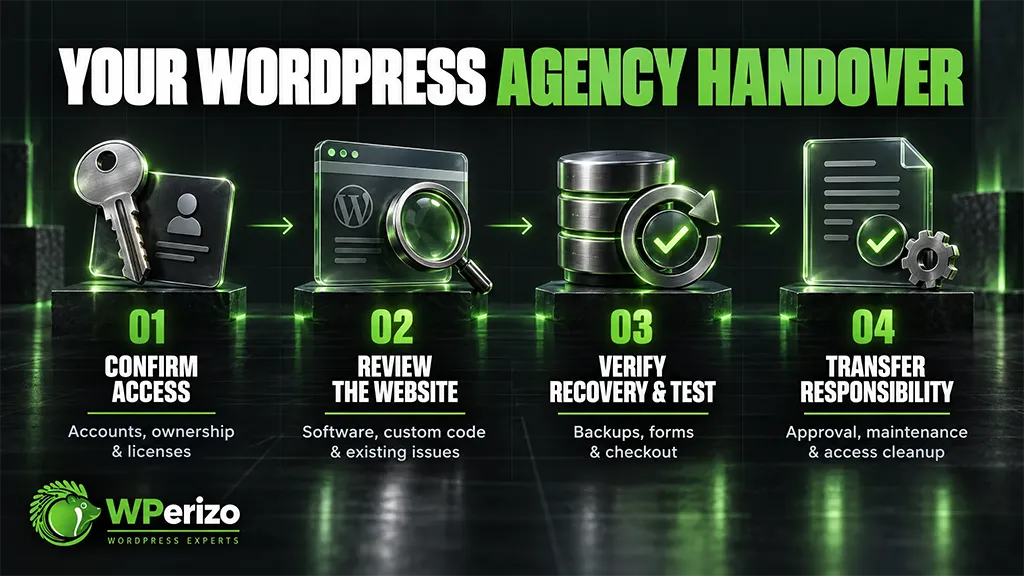
A WordPress login is only one part of a handover. Establish who controls each account, who pays for it, and what happens when the current agreement ends.
| Asset or service | What to establish |
|---|---|
Domain and DNS | Registrar, account holder, renewal responsibility, and access to DNS records |
Hosting | Where the website runs, who manages the account, and how site-specific access is granted |
WordPress | Named user accounts and permissions appropriate to the agreed work |
Themes and plugins | Purpose, subscription owner, renewal date, and any replacement license needed |
Custom code | Current source files, repository access where applicable, and deployment instructions |
Backups | What is included, where copies are stored, and who can restore them |
Email and forms | Sending service, account owner, recipients, and CRM connections |
Analytics and search tools | Business access to existing properties, reporting, and tracking configuration |
Commerce integrations | Payment, shipping, tax, inventory, and accounting connections where relevant |
Access and ownership are not the same thing. An administrator login does not settle contractual rights to design files, custom code, or third-party assets. Review the agreement and clarify anything uncertain with the relevant provider.
If your site shares an agency hosting account with other clients, request an appropriate site-level handover—not unrestricted access to that agency’s entire account.
Clarify what happens to agency-provided licenses
A premium plugin may be installed on your website while its subscription belongs to the agency.
For each paid component, confirm:
Whether your business already owns the subscription.
Whether it can be transferred under the vendor’s terms.
Whether you need to purchase a replacement subscription.
What happens to updates, support, and connected services.
Do not assume that losing a license immediately breaks the site—or that everything will keep working indefinitely. The consequences depend on the product and its terms.
Keep essential components in place until their dependencies and replacement arrangements are understood.
Ask for a technical review with a useful outcome
A takeover review should help you make a decision, not simply produce a long list of warnings.
Ask the incoming team to separate its findings into:
Handover blockers: missing access, unclear rights, or unavailable dependencies.
Necessary repairs: faults or security issues that need attention.
Ongoing maintenance: updates, backups, monitoring, and routine checks.
Optional improvements: changes that could help but do not prevent a safe takeover.
For each significant issue, ask what it affects, what evidence supports the finding, and what work is proposed.
The assessment should cover installed software, custom code, hosting, recovery options, and the customer journeys your business depends on—from inquiry forms to online purchases.
If the main problem is a specific fault, WordPress Repair may be the appropriate first project. Ongoing care can be agreed once the baseline is clear.
Separate the handover from a hosting migration
Changing who maintains your website does not necessarily require changing where it is hosted.
Combining a new agency, a hosting move, a redesign, and major software updates creates more changes to investigate if something fails. Keep the initial scope focused unless there is a clear reason to combine the work.
Before canceling an existing service, confirm whether it also provides:
Business or transactional email.
DNS management.
Backups and staging environments.
Licenses or integrations used by the live site.
If hosting must change, treat it as a defined migration with its own tests and recovery plan. Our WordPress Migration service addresses that separate piece of work.
Verify backups before making changes
WordPress has two essential parts to back up: the database and the files. Its official backup guidance explains why both are needed to restore a typical installation.
Before the handover, confirm that:
The backup contains the required files and database.
The authorized incoming team can retrieve it.
Restoration has been verified in an appropriate isolated environment.
Someone has clear authority to approve recovery.
Protect the backup itself: it may contain personal data and sensitive configuration information.
For WooCommerce, an older backup is not a harmless reset button. Restoring an older database can remove records created after that backup, including new orders.
WooCommerce needs more than a visual check
A storefront can look correct while an important part of the order process is failing.
When switching WordPress agencies for a WooCommerce store, agree on tests that reflect what you actually sell and how orders are handled.
| Area | What to verify |
|---|---|
Products | Variations, prices, stock behavior, and relevant product rules |
Checkout | Shipping, tax, discounts, and supported payment methods |
Payments | Expected order-status changes and communication with the payment provider |
Customer communication | Order emails, account access, and password recovery |
Operations | Fulfillment, inventory, and accounting connections where used |
Recurring activity | Subscription renewals and scheduled tasks where applicable |
Use a controlled test plan. A copied store must not accidentally charge customers, send production emails, or trigger fulfillment.
Also agree how development changes reach production without overwriting newer customer and order data. A staging copy is a testing environment, not automatically a safe replacement for a live store’s database.
Our WooCommerce development services are relevant when the handover also involves changes to your store or its functionality.
Agree when responsibility changes
A handover is not complete simply because both agencies can log in.
Put the following in writing:
Who approves changes and handles urgent incidents during the transition.
Which tests must pass before acceptance.
Which known issues remain open.
When maintenance and support responsibility change.
When outgoing access will be removed.
Use individual account invitations where possible, or an agreed secure method for sharing credentials. Do not put passwords into an ordinary contact form or a shared handover document.
Once the incoming team has verified control and the handover is accepted, remove access that is no longer required. Review shared credentials and integration dependencies before rotating them.
For ongoing care, agree what WordPress Maintenance includes—and which repairs, support requests, or development tasks require a separate scope.
What affects the cost of switching WordPress agencies?
The workload depends on what is being transferred and what needs fixing.
Ask for these items to be separated in the proposal:
| Scope | What it covers |
|---|---|
Initial assessment | Establishing access, dependencies, condition, and risks |
Handover | Transferring the agreed assets, responsibilities, and documentation |
Repairs | Fixing problems discovered during the assessment |
Migration | Moving infrastructure if necessary |
Ongoing care | The maintenance and support services agreed after takeover |
New development | Features or design changes outside the handover |
This makes proposals easier to compare and avoids treating existing technical problems as if they were automatically included in routine maintenance.
There is no useful universal handover price without knowing the website, its access arrangements, and the work required.
Considering a new WordPress partner?
You do not need a finished technical specification to have a useful first conversation.
Start with:
Your website URL.
What you want to change about the current setup.
Any known faults or unfinished work.
Whether the site handles orders, bookings, or memberships.
Any deadline tied to your current agreement.
If you do not know who controls the hosting or licenses, say so. Those are questions to resolve during the handover process.
WPerizo works exclusively with WordPress and WooCommerce, covering development, repairs, migrations, and ongoing maintenance.
Discuss your existing website with WPerizo. Start with the URL and what you need from your next technical partner. We can discuss the appropriate next step and whether a scoped technical assessment is needed.
Please do not include passwords in your initial inquiry.
WPerizo.com — WordPress & WooCommerce. Nothing else. 🦔