Someone asks ChatGPT for a WordPress maintenance provider in Florida. Someone else asks Perplexity why their checkout is slow. A third asks Claude what to do about a plugin that just took their site down.
Those are your customers, asking your questions, and none of them are on Google.
The uncomfortable part is that ranking well has stopped being the same thing as being readable. A site can sit at position three for its main keyword and still never get quoted, because the systems doing the quoting parse pages differently than a search crawler does. We spent last week going through our own site with that in mind. Four things mattered. One of them was a mistake we’d been making for months without noticing.
Structured data has to be unambiguous
Language models lean on structured data far more heavily than Google ever did. Schema markup is the one place on a page where meaning is stated outright instead of inferred from prose, and a model that has to choose between parsing your layout and reading a clean JSON-LD block will take the block every time.
Which makes the way most WordPress sites break it worth knowing about.
If you run Rank Math or Yoast, your SEO plugin already outputs schema on every post. If you then add your own JSON-LD — for an FAQ, a how-to, anything your plugin doesn’t cover — you now have two blocks on the same page. That’s fine. Two blocks are allowed.
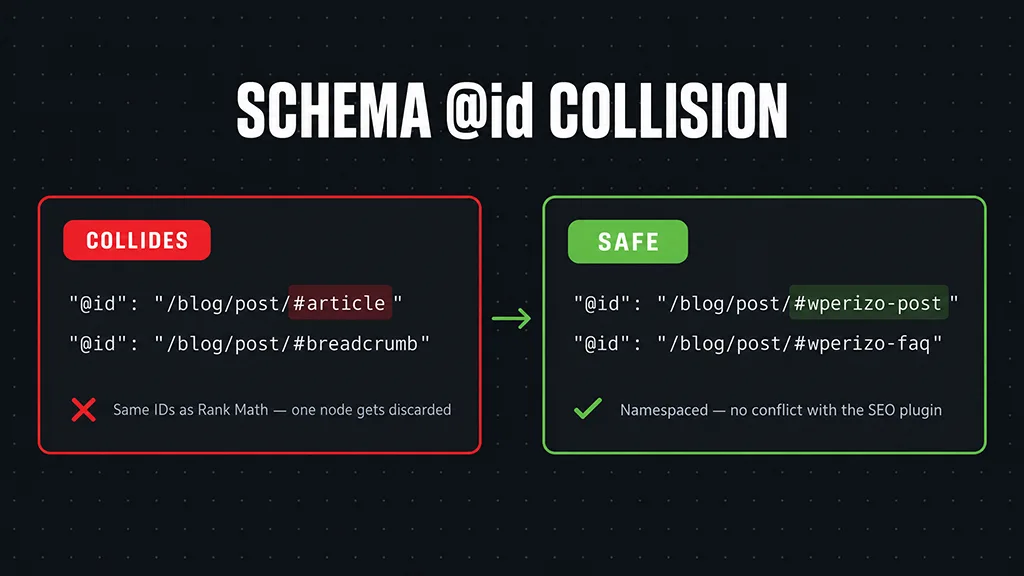
What isn’t fine is two nodes sharing an @id. Rank Math names its article node #article and its breadcrumbs #breadcrumb, and almost every schema template you’ll find online uses exactly those same names. When a parser hits two nodes with one identifier, it merges them or discards one, and which one survives is not something you get to decide.
The fix takes ten seconds. Namespace your own identifiers:
"@id": "https://example.com/blog/post-slug/#mysite-post"
Then delete anything your SEO plugin is already handling. You do not need a second BreadcrumbList. You do not need a second Organization. Let the plugin own those, and use your own block only for what it genuinely adds.
Keep FAQ and HowTo markup, even though Google stopped showing it
In 2023 Google removed HowTo rich results entirely and restricted FAQ rich results to government and health sites. A lot of people stripped that markup out afterwards. It wasn’t earning anything in the SERP, so why carry it.
Because the SERP isn’t the only consumer anymore.
An FAQPage block is a list of questions with answers attached — the exact shape a language model wants when someone asks a question that matches one of yours. A HowTo block is an ordered set of steps with tools and timings. Neither needs a rich result to be useful. They’re useful because they remove every bit of guesswork about what your page actually says.
We put both back. Our Elementor post carries six FAQ entries and a five-step HowTo, and nothing about that shows up in Google. That isn’t the point.
The honest version of llms.txt
You’ll have read about llms.txt by now. The idea is a markdown file at your domain root that tells AI crawlers what your site is and which pages matter — robots.txt for language models, roughly.
Rank Math will generate one for you, and recent versions have a toggle for it. It costs nothing to enable.
But here’s the part the enthusiastic posts leave out: no major AI provider has committed to reading it. It is a proposal, not a standard. Enable it, because the downside is zero and adoption may come. Don’t mistake it for the work. The schema is the work.
The blockers you don’t know you have
This is where we found ours.
Checking the blog in WordPress admin, every post showed No Index in the Rank Math column. Not one or two. All of them. The global setting for posts had never been switched to index, and nothing in the editor flags it — the posts publish, they look right, they sit in the sitemap. They just carry an instruction telling every crawler to ignore them.
Go look. Rank Math → Titles & Meta → Posts, and confirm Robots Meta says index. Then view the page source on a live post and search for robots. You want:

Three more places to check while you’re there:
robots.txt. Some security plugins and host configurations block AI user agents by default — GPTBot, ClaudeBot, PerplexityBot, Google-Extended. Sometimes that’s deliberate. Often nobody chose it.
Cloudflare. Bot Fight Mode and the newer AI-crawler blocking toggle will stop these agents cold, regardless of what your robots.txt says.
Content behind JavaScript. Tabs, accordions, anything that loads on interaction. Googlebot renders JavaScript. Most AI crawlers do not. If your pricing lives inside a collapsed accordion, assume it isn’t being read.
What we’d actually prioritise
If you do one thing, check for a stray noindex. Everything else is optimisation; that one is a site-wide off switch, and it’s silent.
Then fix your schema identifiers, because a merged node is worse than no node.
Then add FAQ markup to the posts that answer real questions. Then enable llms.txt, last, because it’s cheap rather than because it’s proven.

None of this is a growth hack. It’s the same discipline as any other maintenance work — the site does what you think it does, and somebody checks.
Not sure what your site is telling crawlers? Get in touch and we’ll look.
Want it checked continuously? Our WordPress Maintenance package is $69/month, fixed — updates staged and tested before they reach production, licences monitored, offsite backups, and the SEO and schema side watched alongside everything else. WooCommerce stores are $89/month.